Category Archives: Uncategorized

🚀 Introducing Hypermail SmartRelay: Smarter Email Delivery, All in One Platform

Email deliverability has never been more complex. Between multiple SMTP providers, IP reputation management, and balancing cold outreach with nurturing campaigns, marketers often find themselves juggling too many tools. That’s why we built Hypermail SmartRelay — a unified solution that connects all your SMTPs and IPs, rotates them intelligently, and ensures the right emails are sent from the right servers.

🔎 What is SmartRelay?

SmartRelay is designed to help you get more emails into the inbox. Instead of relying on a single provider, you can connect any SMTP — with built‑in support for Amazon SES, InboxRoad, Mailgun, PostMark, Sendgrid, SMTP.com, and SMTP2Go — or integrate your own custom SMTPs and IPs.

From there, SmartRelay gives you the power to:

  • Rotate traffic across multiple servers to keep your reputation healthy.
  • Set flexible rules to decide which SMTP to use for each list, domain, or campaign.
  • Track performance in a single dashboard with real‑time deliverability insights.

It’s all about giving you more control and better results.


📈 Why SmartRelay Improves Deliverability

SmartRelay isn’t just about convenience — it’s about optimizing inbox placement. Here’s how:

  • Rotate IPs & SMTPs: Prevent overload on a single provider and spread volume intelligently.
  • Smart Rules: Route Gmail users via one SMTP, Yahoo users via another, or balance traffic across all.
  • Warm Up New IPs: Gradually build trust with ISPs by controlling send volume.
  • Optimize Performance: Match the right SMTP to the right audience for maximum impact.
  • All‑in‑One Dashboard: Monitor every SMTP’s performance without switching tools.

❄️ Cold Outreach + Warm Nurture, Together

Unlike most platforms, Hypermail doesn’t force you to separate cold and warm audiences. With SmartRelay, you can:

  • Send cold campaigns safely using dedicated SMTPs/IPs for prospecting lists.
  • Identify engaged prospects by tracking opens, clicks, and replies.
  • Move them to premium SMTPs for nurturing, follow‑ups, and promotions.
  • Protect your reputation by keeping cold traffic away from trusted IPs.

This means you can run both outreach and relationship marketing in one place — without risking your sender reputation.


💵 Pricing Made Simple

SmartRelay scales with your needs:

  • Up to 500k sends – $199/month (+$25 setup)
  • Up to 1M sends – $299/month (+$25 setup)
  • Up to 5M sends – $599/month (+$25 setup)

All plans include unlimited contacts, unlimited SMTP relays, and full ESP/SMTP rotation.


⚙️ How It Works

  1. Connect your SMTPs – Add your own accounts or servers.
  2. Set your rules – Choose how to split or rotate traffic.
  3. Send your campaigns – Hypermail handles the routing in the background.
  4. Review results – See deliverability metrics for each SMTP and adjust.

👥 Who Benefits from SmartRelay?

  • Agencies: Manage multiple brands, each with their own SMTP setup.
  • Marketers: Improve inbox rates by rotating IPs and using the best SMTP for each domain.
  • Cold Email Senders: Prospect on one IP, nurture engaged leads on another.
  • High‑Volume Senders: Spread millions of sends across multiple providers.

✅ Why Choose Hypermail SmartRelay™

  • Use your own SMTPs — no lock‑in.
  • Handle both cold and warm sending in one system.
  • Protect and grow your sender reputation.
  • Scale sending capacity with ease.
  • Get all your deliverability data in one place.

Hypermail SmartRelay is the smarter way to manage email deliverability. Whether you’re an agency, a high‑volume sender, or a marketer balancing cold outreach with nurturing campaigns, SmartRelay gives you the flexibility, control, and insights you need to succeed.

👉 Request a Demo or Contact Sales today to see SmartRelay in action.


Wo
📢 Hypermail API Documentation Now Available Online


We’re excited to share that the Hypermail API documentation is now live and accessible directly on our website in addition to to our platform . Developers and teams can explore the full set of endpoints, parameters, and integration examples at

👉 https://hypermail.com/api

Hypermail is a powerful email marketing platform designed to help businesses run effective campaigns and ensure deliverability through built‑in email verification. With the API, you can automate campaign creation, manage subscriber lists, and integrate Hypermail seamlessly into your existing workflows.

🔗 Webhooks for Real‑Time Updates

In addition to the core API docs, we’ve published detailed information on webhooks — perfect for keeping your systems in sync with Hypermail events such as opens, clicks, bounces, and unsubscribes. You can find the webhook documentation here:

👉 https://hypermail.com/api/webhooks

Introducing True Click trust your click data again

Inbox security tools are great at stopping bad links—but they also “click” every URL in your emails, bloating reports and tripping automations you only wanted real people to trigger. True Click (Beta) is Hypermail’s new account‑wide option that helps cut down those bot-driven clicks whenever link tracking is turned on.

What True Click does

  • Adds a quick verification hop: Every tracked link briefly routes through a Hypermail verification page that runs a few security checks.
  • Preserves your destination: After the checks, the visitor is sent to the original URL you included.
  • Counts the click after verification: A click is only recorded on the second redirect, helping filter out many automated scanners.

Why it matters

  • More accurate engagement metrics: See a truer picture of who actually clicked.
  • Cleaner automations: Fewer false triggers for click-based journeys, scoring, and goals.
  • Better decisions: Optimize content and targeting with data that’s less skewed by bots.

How to enable True Click

  • Go to Email Marketing then in the sidebar click System Settings in your Hypermail account.
  • Check the box for “True Click (Beta).”
  • Click Save.

Once enabled, any tracked link will include the extra verification step automatically. No template or URL changes required.

How it flows

  • Recipient clicks a link in your email.
  • Hypermail sends the visitor to a lightweight verification page.
  • Checks run to help distinguish bots from humans.
  • If passed, the visitor is redirected to your original URL.
  • The click is counted only after that second redirect.

What to expect

  • Likely fewer total clicks in reports as bot activity is reduced.
  • Minimal impact on subscribers at most a very quick additional redirect.
  • Works only when click tracking is enabled for the send.

Best practices

  • Compare before/after metrics to understand the impact on your audience.
  • Review click-triggered workflows; you may notice improved precision.
  • Let stakeholders know that reported clicks may decrease due to better filtering.

Good to know

  • Beta status: We’re actively tuning detection and welcome your feedback.
  • Not a silver bullet: Advanced bots may still appear, but the goal is meaningful reduction.
  • Account-level control: Turn it on or off anytime in System Settings.

FAQs

Does True Click change my links? No. The final destination remains exactly what you set; True Click simply inserts a brief verification hop.

Will subscribers notice? Most users won’t notice anything beyond a near-instant redirect to the intended page.

Do I need to edit my templates? No. Enable True Click at the account level and it applies to tracked links automatically.

Can I disable it? Yes. Uncheck “True Click (Beta)” in System Settings and Save.

Get started Flip on True Click in System Settings to reduce bot clicks and get clearer engagement data in Hypermail. We’d love to hear what you see and how we can keep improving.

New in Hypermail: Turn Unsubscribes Into Marketing Insights

Email marketers often view unsubscribes as the end of the conversation. With Hypermail’s new Unsubscribe Survey, they can become the start of a learning opportunity instead.

We’ve added a simple way to capture feedback whenever someone leaves your list—so you can understand why they opted out and use that knowledge to improve future campaigns.


What Happens When Someone Unsubscribes

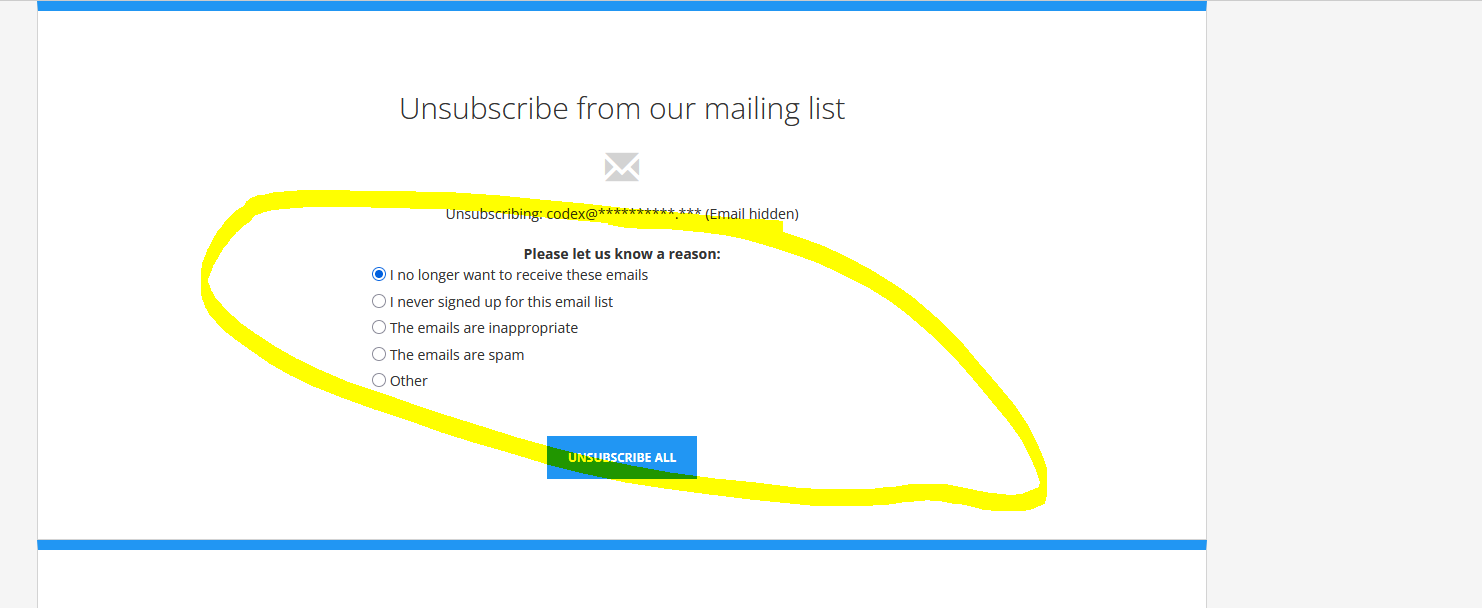
Now, when a subscriber clicks “unsubscribe,” they’ll be asked to choose one of the following reasons:

  • No longer want emails (Default)
  • I never signed up for this email list
  • The emails are inappropriate
  • The emails are spam
  • Other (with space to type in a custom reason)

If they select Other, they can tell you exactly what drove their decision in their own words.


See the Story Behind the Numbers

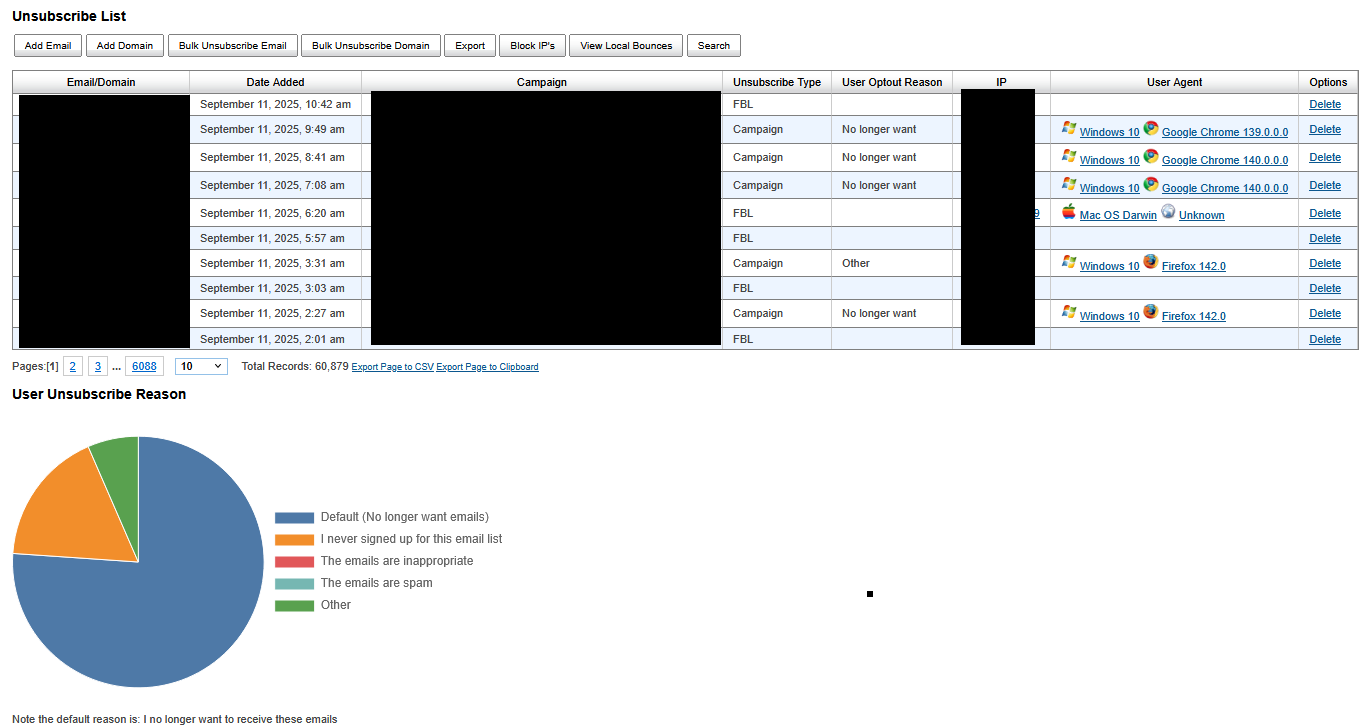
Inside Hypermail, you’ll now find a visual breakdown of unsubscribe reasons right in your dashboard. Each opt-out shows the chosen reason, and a pie chart view makes it easy to spot patterns at a glance.

  • Too many “spam” complaints?
  • Lots of “not relevant” responses?

With clear data in hand, you can tweak your sending frequency, improve segmentation, or refresh your email content strategy to match what your audience actually wants.


Why This Matters for Your Marketing

Unsubscribes are inevitable—but losing people without knowing why is a missed opportunity. Hypermail’s Unsubscribe Survey helps you:

  • Protect your sender reputation by spotting issues before they escalate.
  • Refine your email strategy based on real subscriber feedback.
  • Keep your list healthy by removing disengaged contacts proactively.

Available Now in Hypermail

The Unsubscribe Survey is live in all Hypermail accounts today. Check your dashboard after your next campaign to see real feedback and start turning opt-outs into insights.

Hypermail AI-Powered Feature Updates for this year so far!

At Hypermail, 2025 has been a landmark year for AI innovation. Our mission is to put the most advanced tools in the hands of email marketers, empowering you with features that don’t just save you time but sharpen your results. Here’s a roundup of this year’s major AI driven launches and improvements so far:


July 15, 2025: SpinText AI Message Variant & Subject Line Creator

We’re excited to announce a powerful new feature for creative experimentation: our SpinText AI Message Variant Creator. Now, with a single click on Generate SpinText AI Message Variant under any message, you can instantly create unique, AI-generated variants of your email content using just one AI credit. But we didn’t stop there when using AI suggestions for subject lines, you’ll now find an option to generate and insert SpinText variations automatically. This means more dynamic, personalized subject lines and message bodies with less manual effort or risk of repeating yourself.


July 8, 2025: AI HTML Message Variant Generator

A day prior, we introduced another productivity booster: the AI HTML Message Variant Generator. When viewing any message, you’ll now see a new button that empowers you to generate a fresh message variant, powered by AI. This tool updates your message’s language and wording, giving you new ways to engage your audience while keeping your messaging authentic and on-brand. Each use costs 1 AI Credit making it simple, flexible, and cost-effective.


July 7, 2025: AI-Assisted Translation Support

On the path to making Hypermail more accessible globally, we’ve rolled out AI-assisted translation, now covering approximately 90% of the platform’s text. Currently, full Spanish support is live: you or your users can switch language preferences under My Account or when editing a user. If your team or your clients need support for additional languages (other than right-to-left scripts), let us know! Our AI-driven translation engine makes new languages a quick addition to our roadmap.


April 15, 2025: Improved Spam Score Insights

Understanding why an email scores a certain way for spam is critical. That’s why we updated the Message Check Spam Score feature: now, when reviewing your message’s spam score, you’ll see a popup link beside each item. Click it for an explanatory breakdown of the relevant Spam Assassin rule making optimization faster and easier.


April 10, 2025: AI Powered Spam Score Suggestions

For even deeper guidance, we added an AI option to the Check Message Spam Score feature. When viewing a message, use this tool to let AI scan your message and subject line. Based on your campaign goals, you’ll receive a tailored list of actionable improvements using just one AI credit.


April 8, 2025: AI Subject Line Suggestions Arrive

First impressions start with the subject line—and as of April, you can now generate five unique, AIpowered subject lines when creating a campaign. This system analyzes your message content (plus any subject you’ve already entered), and generates suggestions on demand. Every Hypermail account comes with 20 monthly AI credits by default, making these smart recommendations accessible for every user.


2025 has marked Hypermail’s evolution into a smart, adaptive platform that leverages the latest in AI to help you do your best work faster. The journey isn’t over: your feedback on what’s most useful, and what you wish was next, helps us and our AI keep getting better.

Have ideas for future AI features, or language support? Contact our team! Let us know what would help you deliver even more successful campaigns.

Here’s to the next wave of AI-powered email marketing!

Grow your Business though Email Prospecting

One of the major growth many start-up companies are using is cold email marketing. Most email service providers do not allow cold email marketing or using purchased email marketing lists. Hypermail is one of the very few providers that offer this service. Hypermail allows sending to B2C and B2B emails.

With Hypermail we offer both self-service and managed marketing services where we can handle the data, message design, landing pages and deployment services.

IRCE Chicago 2018

We will be attending the IRCE Chicago trade show which takes place June 5 though June 8 2018

If you would like to meetup please contact us. We hope to see you there!

Affiliate Summit East 2017

Hypermail will be attending Affiliate Summit East 2017 from July 30 to August 1st.  We would be happy to meet with current clients or existing clients to discuss your needs.

Please contact us to setup a meeting.

Affiliate Summit West 2017 Las Vegas Jan 15 to 17th

Hypermail will be attending Affiliate Summit West 2017 Jan 15 to 17th.

We will have representatives of our company at that event. If you would like to meetup or discuss please let us know. Either send us an email or talk to your account manager.